 Younisource
Everything your organization runs on,
in one platform
People, attendance, tasks, and curriculum — run it all from one place across admin, user, and kiosk modes.
Three modes, one system
Admin
Manages the organization's people, ranks, classes, attendance, tasks, and curriculum.
- Register and manage people without accounts, and link an account when you need one.
- List the group in search and set a join policy to take in new people.
- Give each rank its own permissions and run the group with sub-admins.
User
Uses the group's content.
- Join by invitation, or find a public group in search.
- Ask questions through inquiries, even before joining.
- Once in, use whichever services the group has turned on.
Kiosk
Handles attendance and tasks on a shared device without login.
- Admins build the pages the kiosk shows.
- Verifies people through the lookup method you configure.
- Registered people can use it without linking an account.
The services you need, only as much as you need
Turn services on and off to fit your organization. People management at the core, with attendance, tasks, and curriculum on one platform.
People
Manage the people who belong to the group.
- Create your own personnel fields and categories to fit the organization.
- Set per field whether it appears in the join form, is required, or shows on profiles.
- Link an account to invite someone into user mode.
Organization
Link multiple groups in parent–child relationships to form a larger structure.
- Attach a standalone group as a child, or detach it again.
- Move people between a parent group and its subgroups.
- See headquarters-and-branch structures laid out as a tree.
Group profile
Compose the group's introduction page block by block.
- Build the page from text, image, link, and YouTube blocks.
- Set each block to public, members only, or private.
- Visitors from search read it and can join or send an inquiry on the spot.
Registrations
Manage how non-members join the group as new people.
- Pick personnel fields to build a join form for your group.
- Choose a policy: join instantly, join on approval, or invite only.
- Approving registers the person right away; rejecting lets you leave a reason.
Inquiries
Receive questions and requests from group members and resolve them with replies.
- Collect questions from group members in one place and answer them.
- Track each one through awaiting reply, in progress, and resolved.
- Groups listed in search also receive inquiries from non-members.
Ranks
Assign ranks to people and set manager permissions.
- Create ranks that match your structure and set their order.
- Choose which services each rank can reach.
- Appoint sub-admins and share the management load.
Classes
Organize people into smaller units.
- Group people into a class once, then reuse it across the other services.
- Assign a task to an entire class at once from Tasks.
- Record and roll up attendance by class from Attendance.
Attendance
Record and manage attendance.
- Record present, late, and absent along with check-in and check-out times.
- Kiosk check-ins land on the register in real time.
- Review monthly totals per person and per class.
Tasks
Assign work and track its progress.
- Assign tasks to a class or to individual people.
- Break work into a checklist, or lay it out on a schedule.
- Status moves through in progress, delayed, and done on its own.
Curriculum
Structure learning content and deliver it.
- Stack content across four levels: curriculum, course, chapter, material.
- Grant access by person, rank, or class.
- Add a date range so material opens only for that period.
Kiosk
Run a shared device dedicated to a group.
- Choose which pages to show: lookup, attendance, tasks, service menu.
- Order the pages to shape the flow people walk through.
- Style the background, fonts, and keypad to match the group.
Brand app
An app under your own name
Put your brand on Younisource, or have a dedicated app built. Both start with a monthly fee and no upfront development cost.
Explore brand appPricing
Younisource is free
People, attendance, tasks, curriculum — the features your organization runs on, free of charge. Both the app and the web are free, with no usage fees or subscription.
Younisource
Free
Every operations feature on app and web, with no limit on people or how long you use it.
Brand app
From KRW 100,000/mo
Your app and web released under your own name and design, with no upfront development fee.
Every Younisource feature is currently free. A storage-based plan may be introduced later, and we'll let you know in advance if pricing changes.
Frequently asked questions
- Is Younisource free?
- Yes. Both the app and the web version are free, with no usage fees or subscription, and no limit on the number of people or how long you use it.
- Which features are included for free?
- People, ranks, classes, attendance, tasks, and curriculum — every feature your organization runs on. All three modes (admin, user, kiosk) are included as well.
- Is anything paid?
- Only a brand app — released separately under your own name — carries a cost. Using Younisource as it is costs nothing.
- Will it stay free?
- We plan to keep the operations features offered today free. That said, usage-based aspects such as storage, or some features added in the future, may carry a separate charge. If pricing changes we'll let you know in advance, and current terms stay in effect until then.
Operations that fit your organization — start with Younisource
Get in touch유니소스가 출시되었습니다
App Store와 Google Play에서 유니소스를 검색해보세요.
조직 운영 플랫폼 유니소스를 정식 출시했습니다. 인원과 출결, 과업과 교육과정까지 흩어져 있던 운영 업무를 하나의 앱에서 다룰 수 있습니다.
손안에 담긴 조직,
유니소스
모든 조직 운영을 하나로
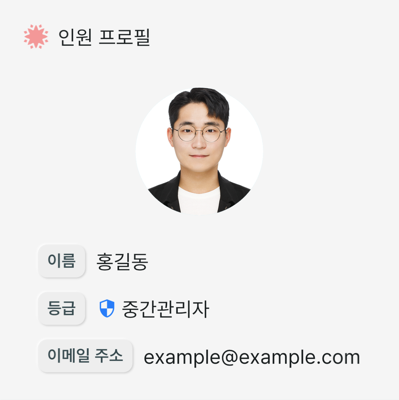
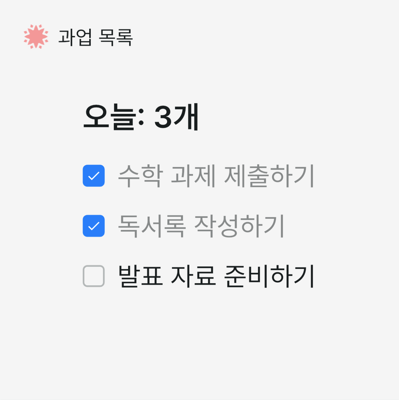
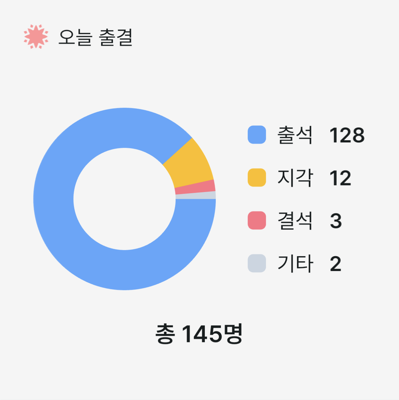
Windows에서 먼저 시작했습니다
유니소스는 2024년 11월 8일 Microsoft Store에 Windows 버전을 먼저 선보였습니다. 이번 정식 출시로 iPhone과 Android, 웹에서도 이용하실 수 있습니다.
시작하는 방법
App Store Google Play 웹으로 이용하기
위 버튼을 눌러 설치하시거나, 설치 없이 웹에서 먼저 살펴보셔도 됩니다.
무엇을 할 수 있나요
유니소스는 세 가지 모드로 나뉩니다. 같은 조직이라도 쓰는 사람에 따라 필요한 화면이 다르기 때문입니다.
| 모드 | 쓰는 사람 |
|---|---|
| 관리자 | 조직의 인원·등급·학급·출결·과업·교육과정을 관리합니다 |
| 사용자 | 그룹의 콘텐츠를 이용합니다 |
| 키오스크 | 로그인 없이 공용 기기에서 출결과 과업을 처리합니다 |
필요한 서비스만 켜서 쓸 수 있습니다.
인원 관리를 기본으로, 조직 유형에 맞춰 출결·과업·교육과정 등을 더하면 됩니다.
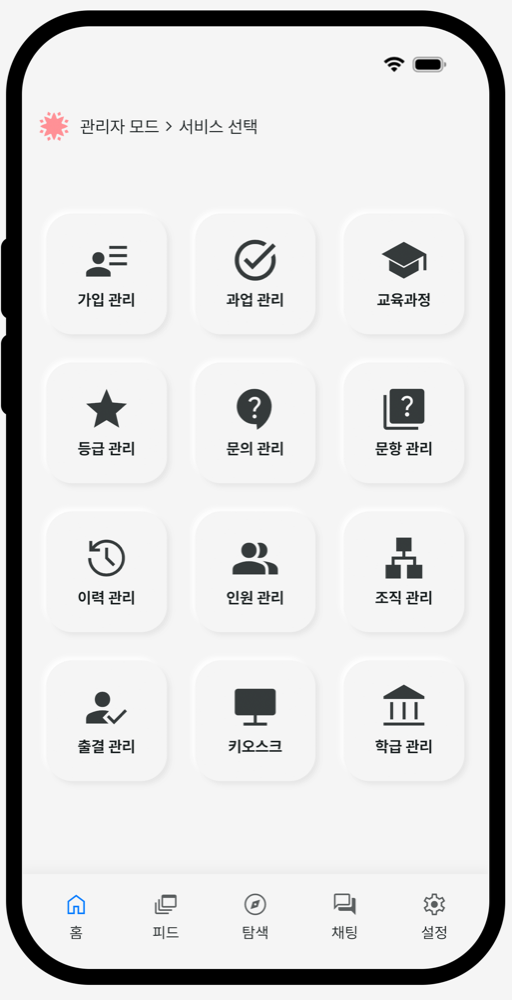
모든 조직 운영을 하나로
인원·과업·교육·출결 등 조직 운영을 한 화면에서 다룹니다.
- 통합 관리모든 기능을 하나의 플랫폼에서
- 체계적인 운영인원·과업·교육·출결 등 조직 관리를 체계적으로
- 안전한 보안 환경등급 기반 접근 제어로 안전하게 보호
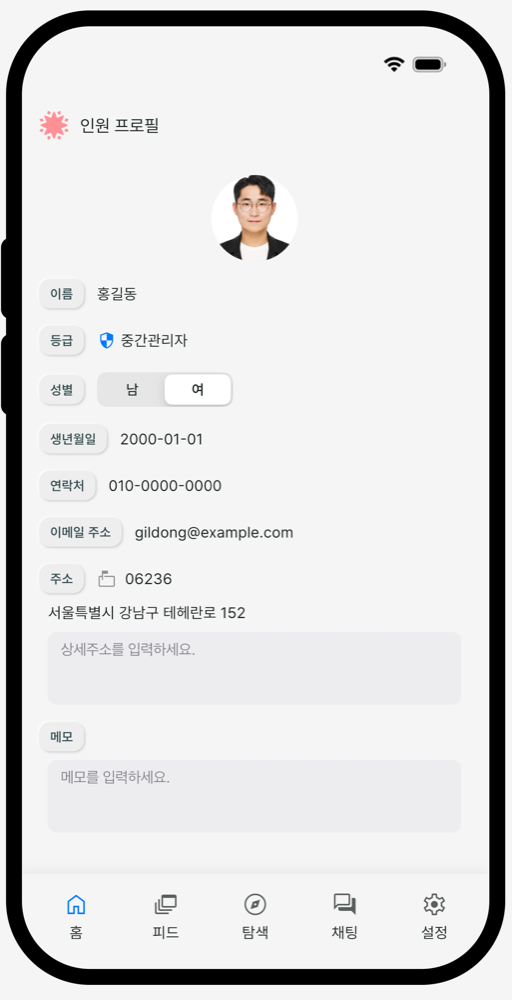
조직의 기준으로 인원 관리
인원 항목과 가입 양식을 조직에 맞게 구성합니다.
- 등급 권한역할에 맞는 접근 제어
- 맞춤 항목 구성조직에 필요한 정보 항목을 직접 추가
- 가입 양식필요한 정보만 받도록 양식 구성
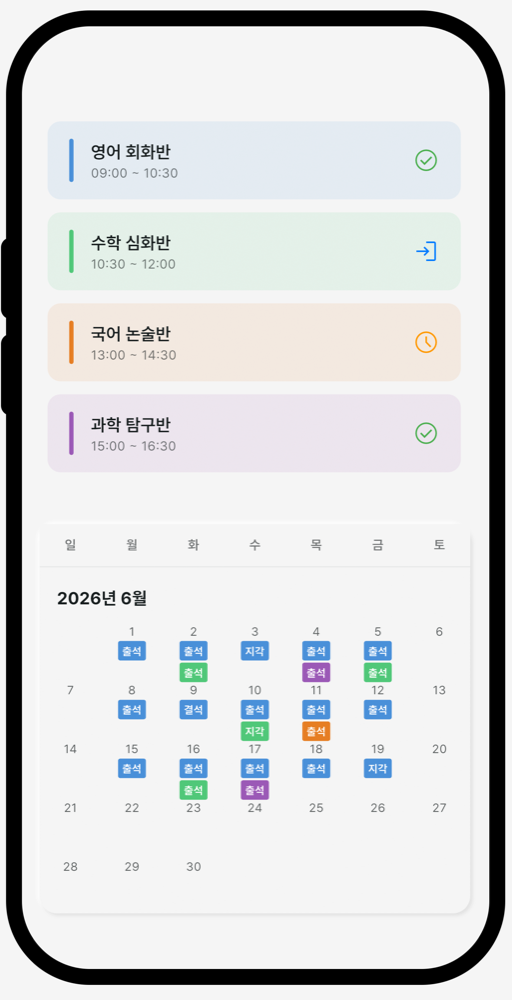
터치 한 번으로 출결 관리
키오스크 단말에서 월별 출결을 기록합니다.
- 월별 출석부달력으로 한 달 출결 정리
- 출석 처리출석·지각·결석 바로 기록
- 키오스크 모드로그인 없이 공용 단말에서 바로
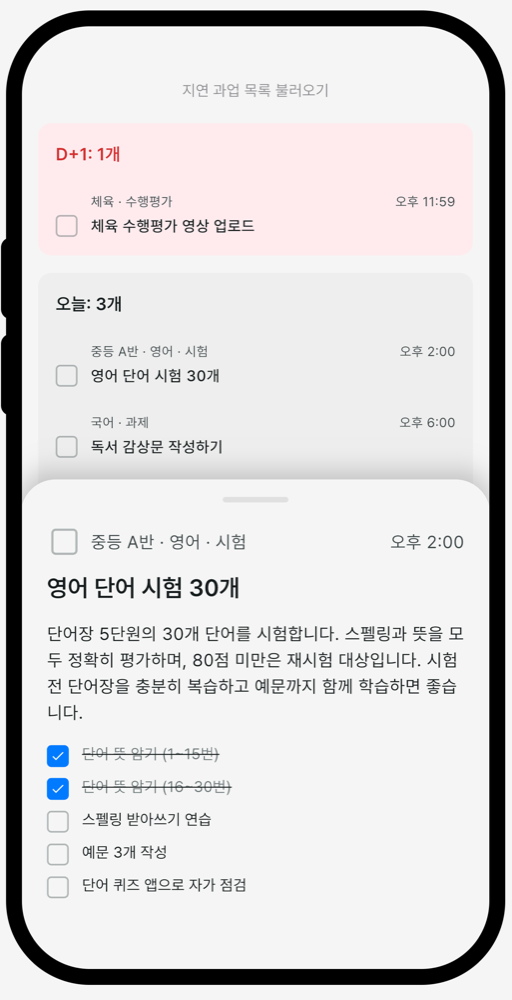
마감을 놓치지 않게 과업 관리
스마트폰과 키오스크에서 마감별 과업과 체크리스트를 다룹니다.
- 마감 기준 정렬지연·오늘·내일 마감별로 자동 정리
- 세부 체크리스트할 일 안의 항목까지 하나씩 체크
- 키오스크 모드로그인 없이 공용 단말에서 바로
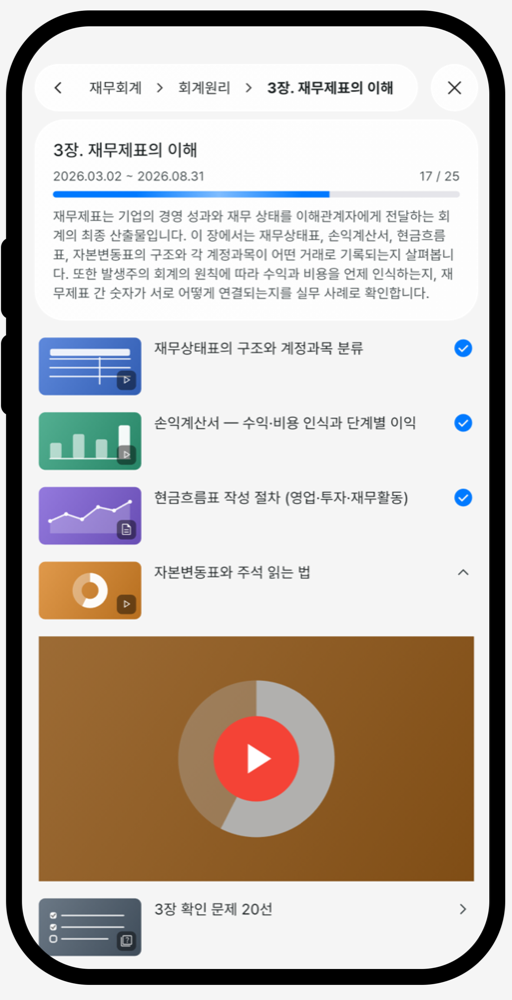
배우는 순서 그대로 교육과정
커리큘럼·과정·목차·학습자료를 단계별로 구성합니다.
- 단계별 구성커리큘럼부터 학습자료까지 계층으로 정리
- 다양한 학습자료영상·URL을 활용한 다양한 콘텐츠
- 학습 진행률어디까지 학습했는지 바로 확인
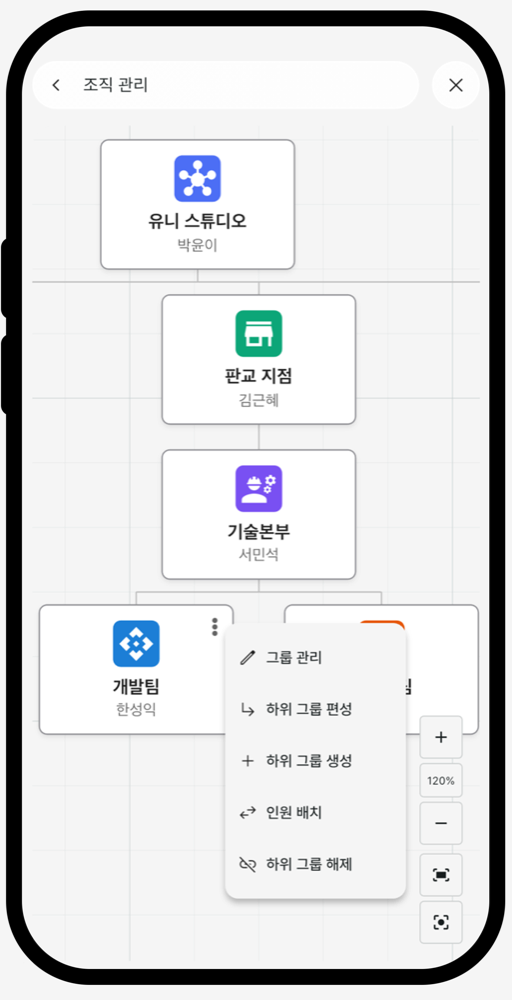
본사부터 지점까지 조직 관리
그룹 간 상하위 관계를 한눈에 보이는 구조로 정리합니다.
- 조직도 한눈에본사·지점·부서를 트리 구조로 확인
- 그룹 편성하위 그룹 생성·편성과 인원 배치까지
- 자유로운 캔버스확대·축소로 조직 전체를 탐색
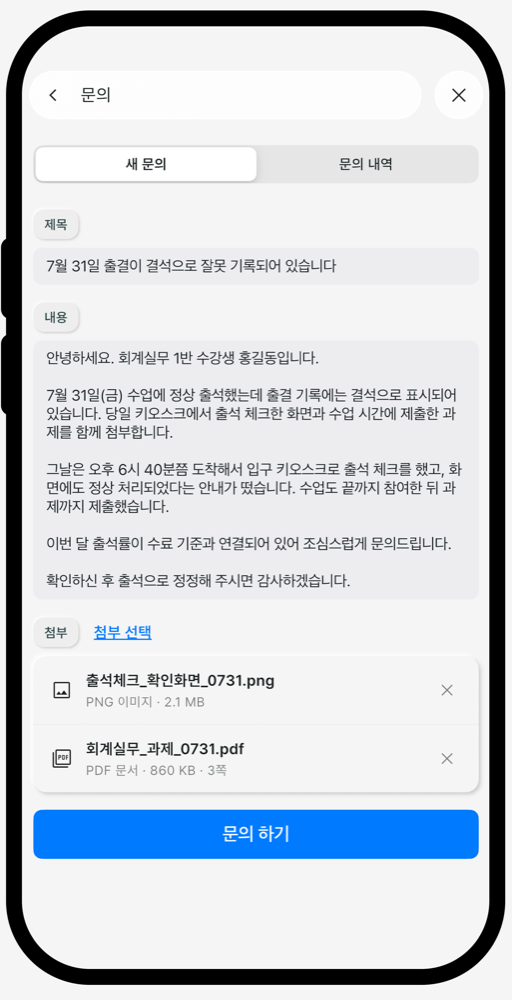
궁금한 점은 바로 문의
소속 그룹 관리자에게 직접 전달됩니다.
- 따로 연락할 필요 없이전화·메신저 없이 앱 안에서 해결
- 이미지·PDF 첨부화면을 그대로 보여주며 상황 설명
- 주고받은 기록언제 무엇을 물었는지 답변까지 남아요
브랜드에 맞춘 앱
하나의 플랫폼으로 각 조직의 브랜드에 맞춘 전용 앱을 만들 수 있습니다. 로고와 색, 기능 구성을 조직에 맞게 구성하고 운영은 그대로 이어집니다.
도입이나 이용에 대해 궁금한 점이 있으시면 문의하기로 알려주세요.
사용자 정의 인원 정보 항목을 추가했습니다
인원 정보 항목을 그룹에 맞게 직접 만들 수 있습니다.
인원 정보 항목을 그룹에 맞게 직접 만들 수 있는 사용자 정의 항목을 추가했습니다. 텍스트부터 금액까지, 일곱 가지 유형을 지원합니다.
일곱 가지 입력 유형
인원 정보에 필요한 항목을 직접 만들 수 있습니다. 유형에 따라 입력 방식과 세부 설정이 달라집니다.
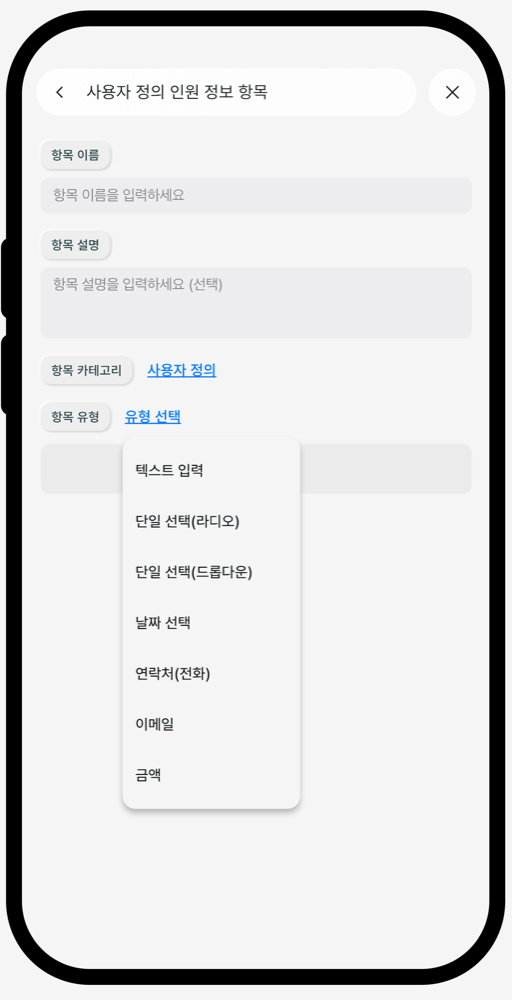
필요한 항목을 직접 만들어
인원 정보 항목을 조직에 맞게 추가합니다.
- 7가지 입력 유형텍스트·선택·날짜·연락처·이메일·금액까지
- 유형별 세부 구성보기 목록·입력 범위·형식까지 지정
- 미리보기로 확인만들기 전에 입력 화면을 그대로
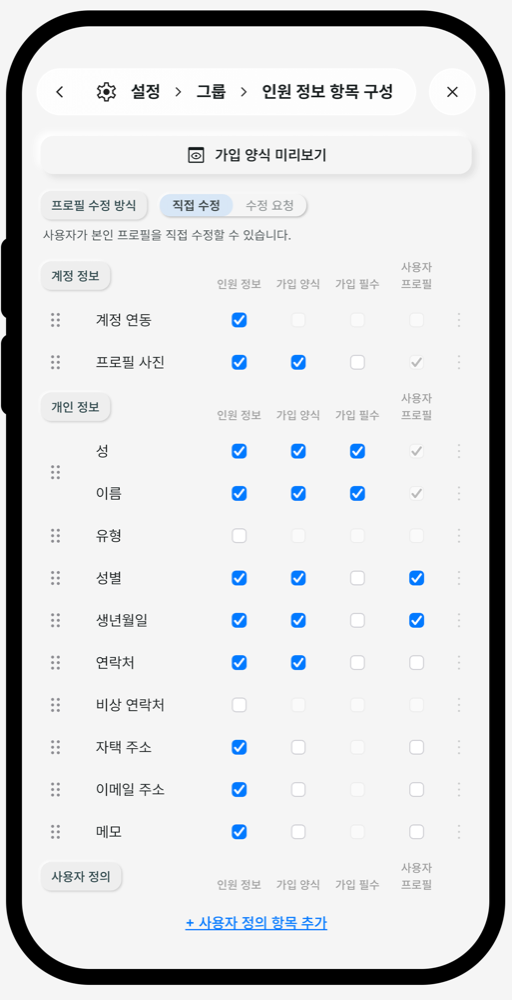
인원 정보 항목을 한곳에서 구성
조직에 필요한 항목만 골라서 사용합니다.
- 항목 구성 열기그룹 설정에서 인원 정보 항목 구성으로
- 사용자 정의 항목 추가목록 아래 추가 버튼으로 새 항목 만들기 시작
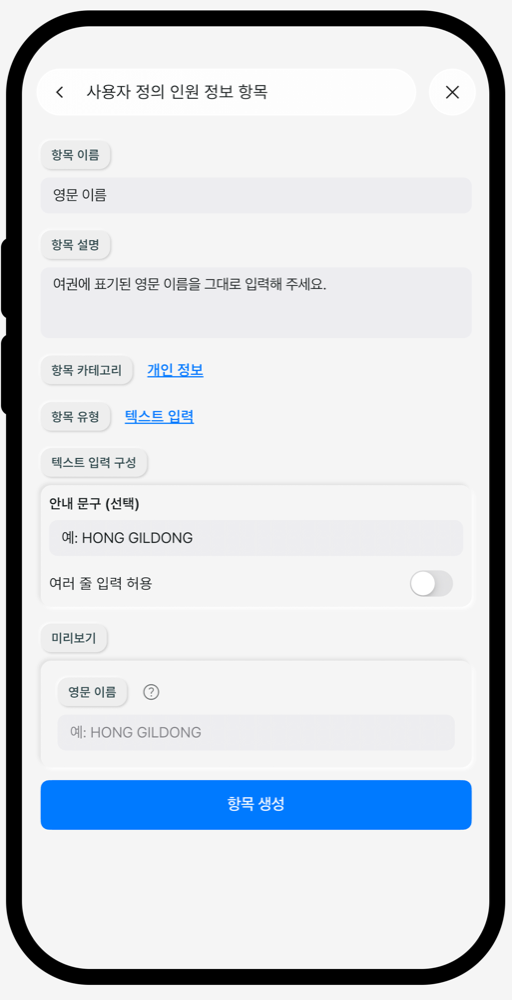
자유롭게 적는 텍스트 입력
입력 방식을 세부까지 지정합니다.
- 텍스트안내 문구를 지정하고, 여러 줄 입력도 받을 수 있습니다
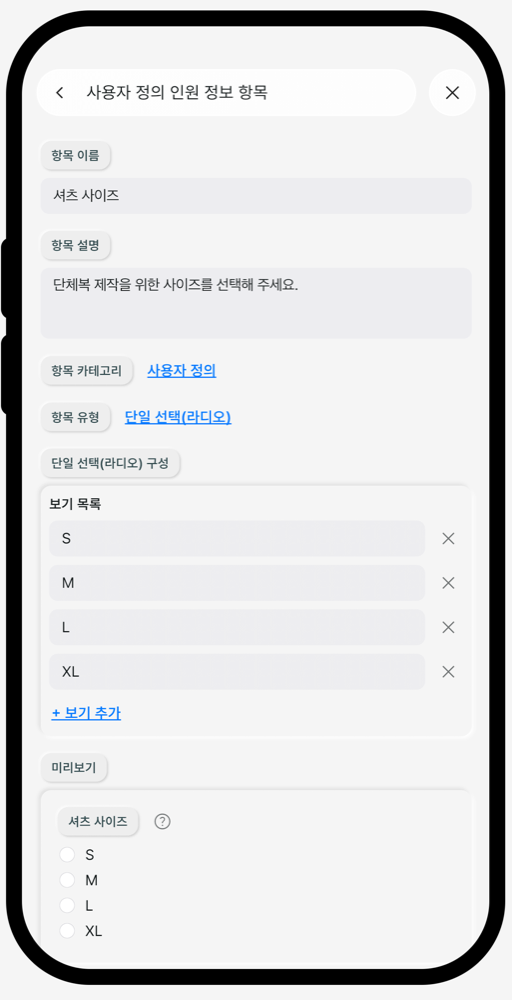
한 가지만 고르는 라디오 선택
보기를 나열해 바로 선택합니다.
- 라디오보기 중 하나만 고릅니다. 필요한 만큼 추가·삭제하고 미리보기로 확인합니다
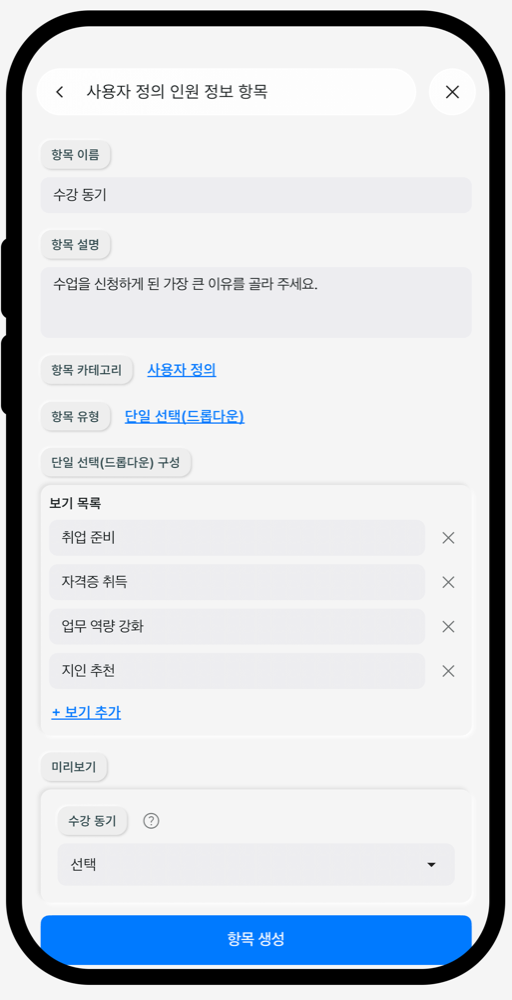
목록에서 펼쳐 드롭다운 선택
보기가 많아도 화면은 깔끔하게 유지됩니다.
- 드롭다운개수 제한 없이 보기를 등록하고, 접힌 형태라 공간을 차지하지 않습니다
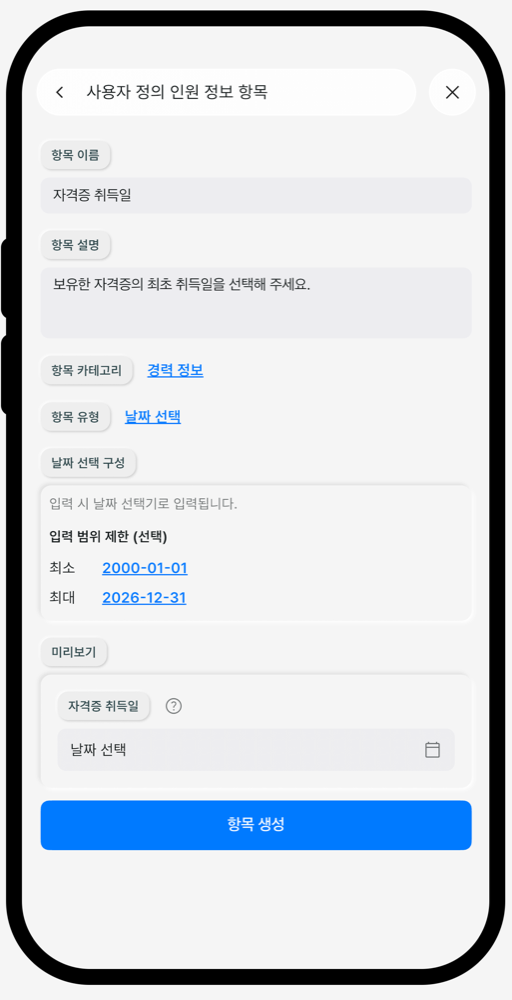
달력으로 고르는 날짜 선택
잘못된 날짜는 애초에 막습니다.
- 날짜직접 입력 대신 달력에서 고르고, 최소·최대 날짜로 범위를 제한합니다
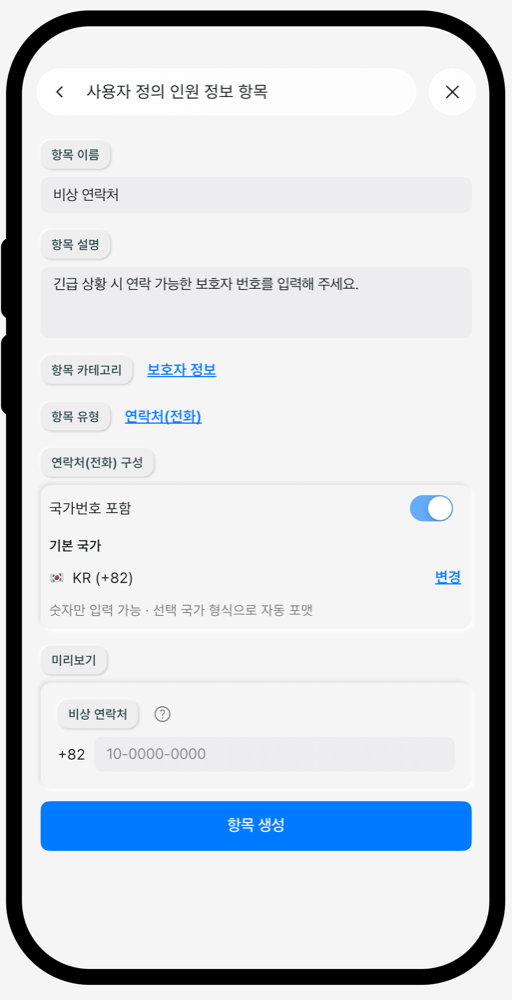
형식 걱정 없는 연락처 입력
숫자만 넣으면 자동으로 정리됩니다.
- 연락처국가번호 포함 여부와 기본 국가를 지정하면 형식에 맞춰 자동 변환됩니다
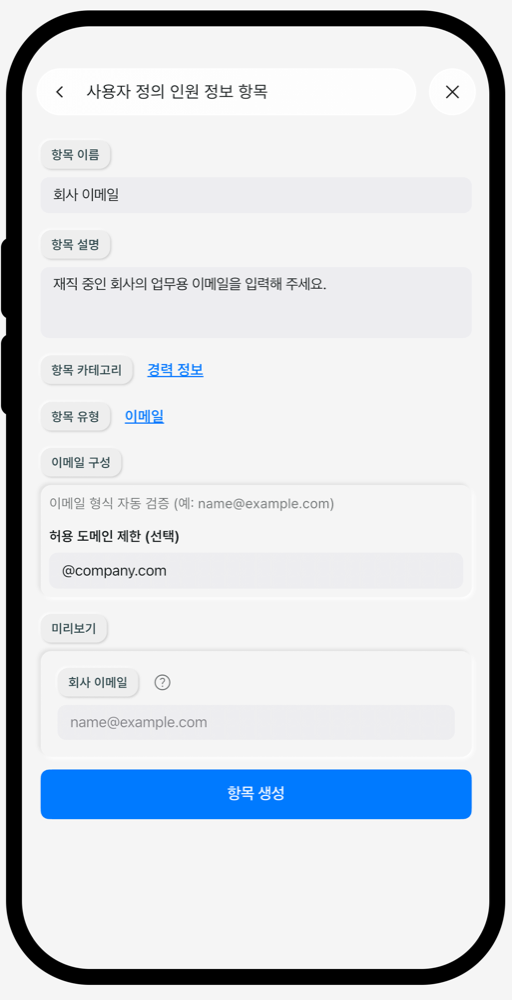
오타를 걸러내는 이메일 입력
형식을 자동으로 검증합니다.
- 이메일이메일 형태가 아니면 입력을 막고, 허용 도메인도 지정할 수 있습니다
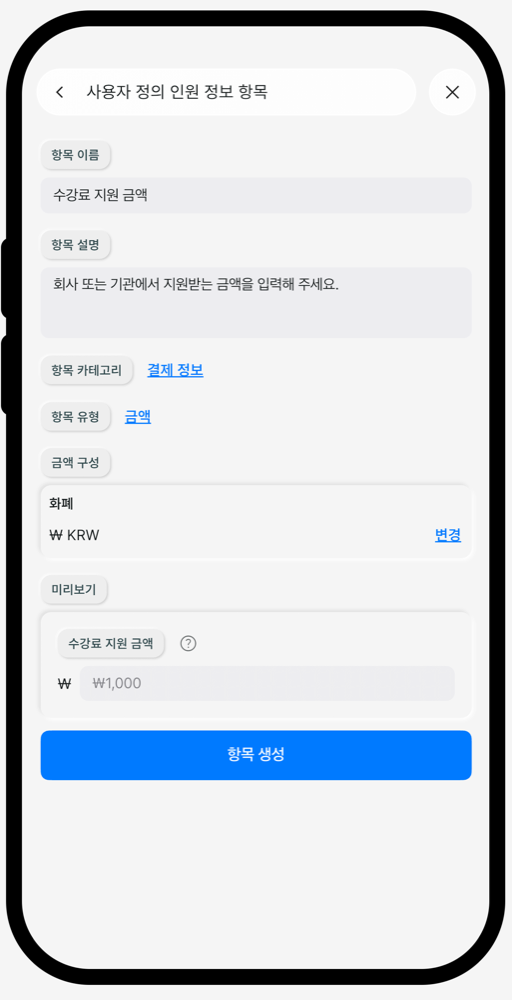
통화까지 맞추는 금액 입력
숫자와 화폐를 함께 관리합니다.
- 금액사용할 통화를 지정하면 통화 기호와 함께 표시됩니다
항목마다 다르게 보여줄 수 있어요
만든 항목은 인원 정보와 가입 양식에 표시할지, 필수로 입력받을지, 사용자 프로필에 공개할지 각각 선택할 수 있습니다.
언제든 수정하고 삭제할 수 있어요
이름과 세부 설정은 언제든 수정하거나 삭제할 수 있습니다.
궁금한 점이 있으시면 문의하기로 알려주세요.